
This release transforms the email experience in Map My Customers, giving reps more control over when and how they send emails, while providing managers with clearer visibility into activity and performance. From AI-powered drafting to scheduling and reporting, these updates are designed to help teams move faster and communicate more effectively.
Feature Updates
1. AI Email Assistant
Write Smarter, Send Faster
The new AI Email Assistant helps reps generate high-quality email drafts in seconds, directly within the compose flow on both web and mobile.
What’s New?
- Prompt-Based Drafting: Generate email copy from a simple prompt
- In-Flow Editing: Review, edit, accept, or regenerate without leaving compose
- Mobile & Web Access: Seamless experience across devices
How it works — Web: Click the AI Write button in the compose toolbar, enter a prompt in the inline field, then review the generated draft and edit, accept, reject, regenerate, or flag the response as needed.
How it works — Mobile: Tap the floating AI button while composing, enter your prompt in the input sheet above the keyboard, then edit, accept, or reject the generated draft, with additional options like Undo, Regenerate, or Report available in the ⋯ menu.
Watch the short demo below:
2. Email Scheduling + Outbox
More Control, Full Visibility
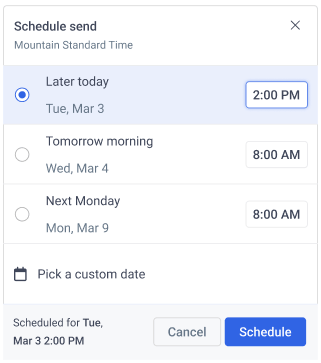
Schedule emails in advance and track every outbound message from a centralized Email Outbox.
What’s New?
- Schedule Send:
- Choose preset send times or set a custom date and time
- Available directly within the compose experience (web + mobile)
- Email Outbox:
- View all emails by status: Outgoing, Scheduled, Sent, Cancelled, Failed
- Reschedule, cancel, or retry emails with ease
.png?width=525&height=378&name=Screenshot%202026-04-07%20at%2010.49.19%20AM%20(1).png)
.png?width=252&height=520&name=Screenshot%202026-04-07%20at%2010.49.57%20AM%20(1).png)
3. Email Volume Reporting
Measure What Matters
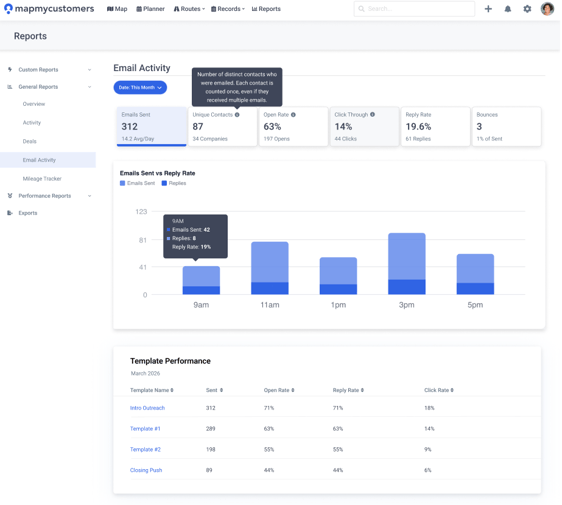
New reporting capabilities give leaders visibility into email activity and effectiveness across reps, teams, and the entire organization.
What’s New?
- Volume Metrics: Emails sent, averages per rep, and total reach
- Engagement Tracking: Opens, clicks, replies, and bounce rates
- Trend Analysis: Performance over time (daily, weekly, monthly)
- Flexible Filtering: Analyze by rep, team, and time range
Highlights
- Faster Outreach: Draft and send emails in seconds with AI assistance
- Greater Control: Schedule emails and manage delivery from one place
- Clear Visibility: Track performance across reps, teams, and campaigns
- Improved Efficiency: Reduce manual work and streamline communication workflows
Why You’ll Love This Release
Your team doesn’t need more tools, they need better ones that actually reduce friction. This upgrade simplifies how reps write, send, and track emails while giving leadership the insights they need to improve performance.
The result: faster outreach, smarter communication, and a more connected view of your team’s activity.