
External Resource Syncing allows teams to connect cloud storage platforms (e.g., Google Drive, OneDrive, Amazon S3 and Sharepoint) directly to Map My Customers and sync files into Resources without manual uploads.
Users can browse their connected storage, select files or folders, and bring them into MMC while maintaining the original folder structure. Once synced, files stay up to date through one-way automatic syncing, ensuring reps always have access to the latest materials when in the field.
This reduces admin overhead, eliminates version control issues, and makes it easier for reps to access and share the right content at the right time.
Resources added via External Resource Syncing can also be pinned through the processes outlined in the Pinned Resources help article.
To connect an external resource:
-
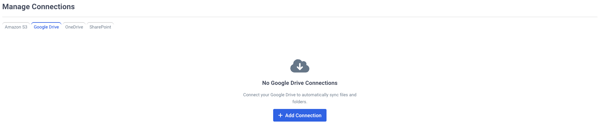
Navigate to the Resources page and select Connections.

- Select the type of connection you will be adding and click + Add Connection.
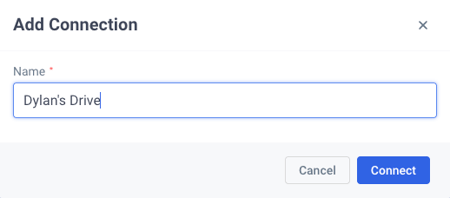
- Enter a name for your connection and click Connect.
- Allow permissions for MMC to access your google drive.
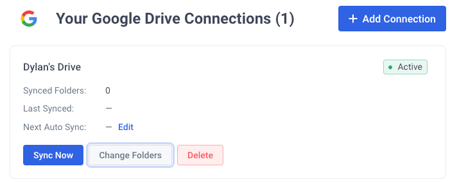
- The connection will now appear in the appropriate tab.
To sync a folder:
-
Select Change Folders when viewing your connections.
- Choose which folder you are syncing and select Add.
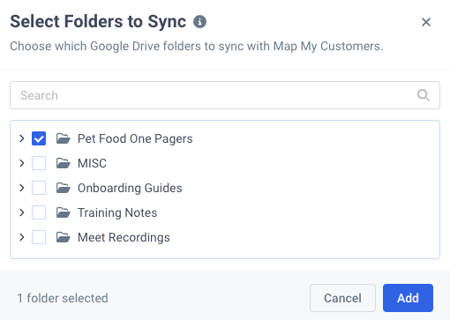
- The connection will update to display the synced folders.
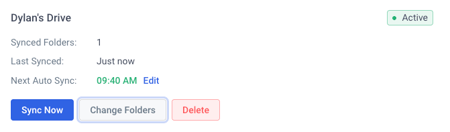
- Click Back to view the resources added from the connection.

- Using the three dots on the right you can share, pin, download, copy link and manage access to the synced resource.
To delete a connection:
-
Select Delete when viewing the connection you would like to remove.
- Type the name of the drive and click Delete.
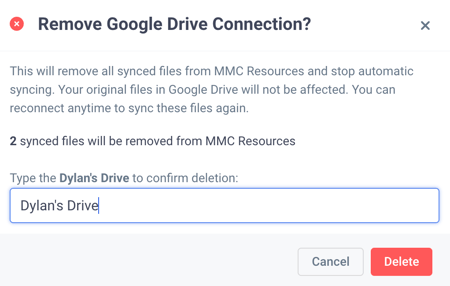
- All files from your connection will be removed from your MMS resources.