
This release focuses on removing friction from everyday workflows, so reps can move faster in the field and teams can operate with less manual overhead. From smarter data capture to better mobile usability and streamlined content access, these updates are designed to make the platform feel faster, cleaner, and more intuitive across the board.
Feature Updates:
1. External Resource Syncing
Connected Content, Always Up to Date
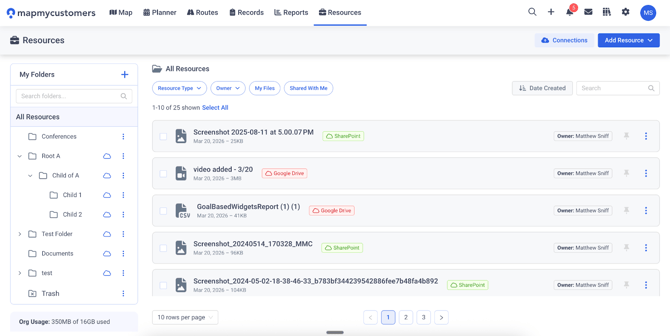
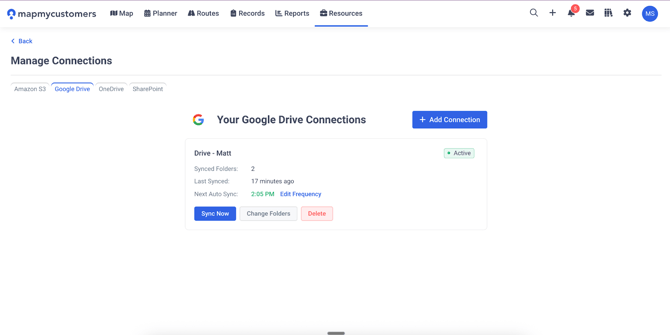
External Resource Syncing allows teams to connect cloud storage platforms like Google Drive, OneDrive, SharePoint, and S3 directly into Map My Customers. Files and folders can be synced into Resources while maintaining structure and automatically staying up to date.
What’s New?
- Cloud Storage Integrations:
- Connect external platforms and browse files directly within MMC
- One-Way Automatic Syncing:
- Keep resources up to date without manual uploads or version control issues
- Folder Structure Preservation:
- Maintain organization when syncing files and folders into Resources
2. Business Card Scanner
From Handshake to CRM in Seconds
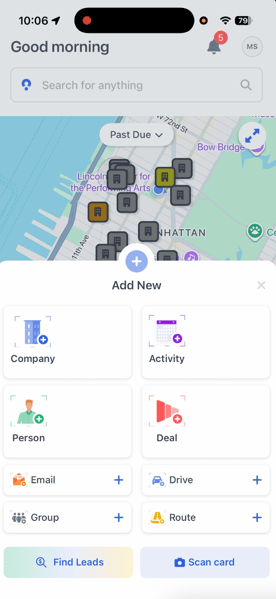
Business Card Scanner enables reps to instantly create new Company or Person records by scanning business cards from the mobile app, eliminating manual data entry and capturing contacts while interactions are still fresh.
What’s New?
- Instant Card Scanning:
- Capture contact details directly from a business card
- Auto-Populated Records:
- Key fields like name, company, email, and phone are extracted automatically
- Mobile-First Workflow:
- Create and save records in seconds while in the field

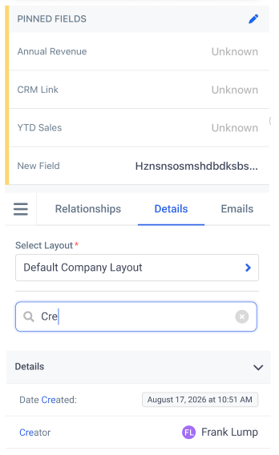
3. Improved Mobile Fields Organization
Faster Navigation, Less Scrolling
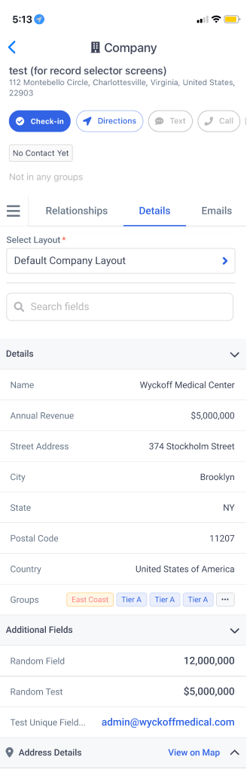
This update introduces a more structured and efficient mobile record experience, making it easier for reps to find and update the information that matters most during customer visits.
What’s New?
- Collapsible Field Sections:
- Organize fields into logical groups for easier navigation
- Field Search:
- Quickly locate fields with real-time search
- Inline Editing:
- Update fields directly without switching modes
- Layout Selector:
- Easily switch between record layouts when multiple exist
4. Activity Pinned Fields
Key Details, Front and Center
Activity Pinned Fields bring the most important activity information to the surface so reps can quickly review, update, and act without digging through multiple screens.
What’s New?
- Pinned Activity Fields:
- Highlight critical fields for quick visibility
- Redesigned Activity View (Web):
- New side panel experience for better structure and usability
- Consistent Mobile & Web Experience:
- Pinned fields appear across activity views and record contexts
- Admin Configuration Controls:
- Managers can define and lock key fields for consistency


Highlights
Less Manual Work: Automate file syncing and eliminate repetitive data entry
Faster Field Execution: Capture contacts and update records in real time
Improved Mobile Experience: Navigate and edit records with less friction
Better Visibility: Surface the most important activity and record data instantly
Why You’ll Love This Release
Field teams don’t need more tools, they need fewer obstacles. This release removes the small points of friction that slow reps down every day, from logging contacts to finding the right information at the moment.
The result: faster workflows, cleaner data, and a platform that works the way your team actually sells.