
This release introduces three major capabilities designed to help field sales leaders see what's happening in the field, improve team efficiency, and optimize execution at scale. The Field Performance Package brings together two new features — Field View and Efficiency Widgets — with Mileage Tracker, an existing feature now packaged alongside them for a more complete view of field efficiency, giving managers unprecedented visibility into rep activity. Alongside the package, Routing 2.0 is a complete rebuild of the route planning experience, making it easier than ever to build, optimize, manage, and execute routes — giving reps faster, more flexible tools to plan and execute their day.
Feature Updates
1. Field View
See What’s Happening in the Field
Field View gives managers and executives direct visibility into how reps are spending their time in the field. Review territory coverage, monitor activity, compare performance across reps, and replay an entire day of field execution.
What's New?
- Rep Trail & Stops: Visualize rep movement and check-ins on an interactive map
- Multi-Rep Comparison: Compare territory coverage across up to five reps simultaneously
- Day Playback: Replay a rep's entire day with a timeline-based map animation
- Timeline Feed: Review activities, check-ins, mentions, deals, and record creation in chronological order
- Heatmap View: Automatically identify high-density areas of field activity
- Activity Downloads: Export field activity and check-in data for further analysis
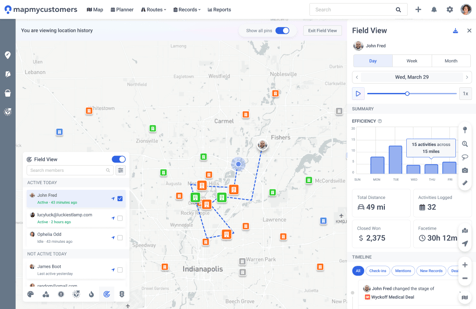
Built-In Efficiency Metrics
Field View includes four performance metrics that automatically update by day, week, or month:
- Total Distance
- Activities Logged
- Closed Won Revenue
- Average Face Time
Managers can quickly understand not only where reps went, but how effectively they used their time in the field.
2. Efficiency Widgets
Measure Field Efficiency in Real Time
Efficiency Widgets introduces a new category of field sales intelligence focused on understanding how efficiently reps operate in the field.
Rather than simply tracking activity volume, these widgets help leaders understand whether field activity is aligned with business outcomes.
What's New?
- Widgets included:
|
Widget |
What it shows |
|
FaceTime vs. Drive Time Ratio |
Share of a rep's field time spent with customers vs. driving |
|
Customer FaceTime |
Total time spent speaking with accounts and clients |
|
Note Completion % |
Share of logged activities with a completed note |
|
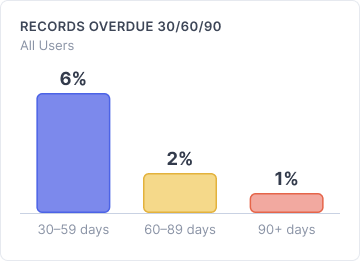
30/60/90 Frequency Coverage |
Number of accounts overdue for a visit, shown as a bar chart |
|
Activity Tracker |
Total activities logged in a given timeframe |
|
Distance Traveled |
Total distance a rep has driven |
|
Drive Time Tracker |
Total time a rep has spent driving |
|
Average Stops Per Route |
Average number of stops on a rep's route |
|
Skipped Accounts Mini-map |
A mini-map of a rep's route, with skipped stops noted along the way |
These insights help leaders understand what efficient field execution actually looks like and make top-performer behaviors easier to replicate across the team.
3. Routing 2.0
Faster Planning. Smarter Routing. Greater Flexibility.
Routing 2.0 is a complete rebuild of the route planning experience, making it easier than ever to build, optimize, manage, and execute routes.
.png?width=477&height=301&name=Routing%202.0%20(web).png)
What's New?
- Redesigned Route Creation (web)
- Faster route creation workflow
- Quick-select scheduling options
- Automatically surface CRM activities scheduled for the selected date
- Temporary Stops
- Add ad hoc locations that don't yet exist in your CRM
- Build routes that combine CRM records and temporary locations
- Anchor Stops
- Lock arrival times for key appointments
- Prevent accidental route changes
- Receive real-time conflict warnings when route changes impact scheduled commitments
- Move Stops
- Move one or multiple stops between routes in a single action
- Eliminate the need to delete and recreate route stops
- Enhanced Routes Page
- New table view
- Sortable columns
- Search and filtering
- Duplicate and delete actions
- Progress Tracking
- Monitor route completion in real time
- Track completed stops across mobile and web
- View route progress at both the route and team level
Mobile Improvements
Reps can now view and interact with new route types, anchor stops, and progress tracking directly from the mobile app for a more consistent routing experience across devices.
Highlights
- See field activity as it happens with Field View
- Measure rep efficiency using real-world field data
- Compare territory coverage and performance across teams
- Build smarter routes with anchor stops and temporary locations
- Improve manager visibility without increasing rep admin work
- Turn field activity into actionable coaching insights
- Field View and Efficiency Widgets alongside Mileage Tracker as the new Field Performance Package
Why You'll Love This Release
Most sales technology tells you what happened after the fact. This release helps you understand what's happening while it's happening.
Field View and Efficiency Widgets, packaged together with Mileage Tracker as the Field Performance Package, give leaders visibility into execution and managers better coaching tools. Routing 2.0 rounds out the release, helping reps spend less time managing systems and more time selling.
The result: greater visibility, better execution, and stronger field performance.